The Research Team Dilemma: Siloed AI Agent Context
When research teams adopt autonomous AI agents to accelerate literature reviews, analyze datasets, or design experiments, they quickly encounter a major bottleneck: agent isolation.
- Researcher A’s agent spends hours synthesizing a complex paper, mapping data dependencies, or extracting key benchmarks.
- Researcher B’s agent, running on a separate machine, has zero knowledge of those findings. It repeats the same discovery process or acts on incomplete context.
- Researchers may not share discoveries in a timely manner.
Standard RAG (Retrieval-Augmented Generation) and standalone vector databases don’t solve this. Vector search stores unstructured text chunks with fuzzy similarity scores—lacking first-class relational edges and offering no clean mechanism for team-wide memory synthesis.
Research teams don’t just need vector search. They need a Federated Central Knowledge Base.
The Solution: AsanagiDB Central Topology
AsanagiDB was designed specifically for multi-node agentic memory. With the Central topology, every researcher gets the best of both worlds: instant local performance and continuous team-wide knowledge sharing.
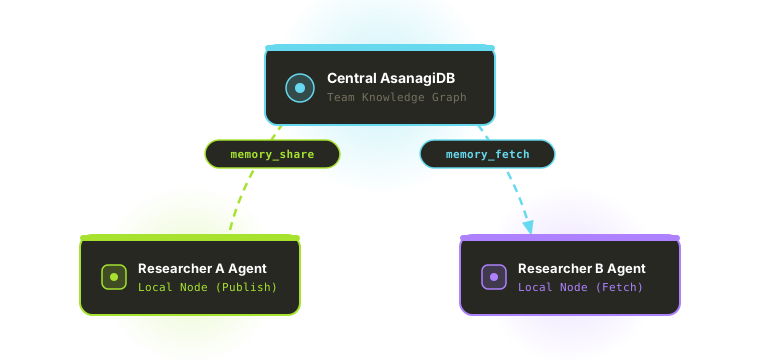
How It Works: Continuous Publish & On-Demand Pull
- Local Speed: Each researcher runs a lightweight, local AsanagiDB instance (
--db-path). Local memory queries run in milliseconds without network round-trips. - Explicit Publish (
memory_share): As Researcher A’s agent uncovers key findings, synthesizes papers, or establishes experimental hypotheses, the model automatically publishes those structured nodes to the team’s central knowledge graph viamemory_share. - On-Demand Pull (
memory_fetch): When Researcher B asks their agent a question, the agent searches the central knowledge base (memory_fetch) and pulls verified findings directly into its local working store when needed (import: true). - The best part is that this federated data is secured from superflous data injections or graph mutations from clients other than MCP clients.
The Golden Rule of Asanagi Federation:
“Your assistant publishes what it learns as it learns it; your teammates’ assistants pull it in as needed.”
Practical Example: A Federated AI Research Workflow
Imagine a machine learning research team exploring novel optimization algorithms.
Step 1: Agent A Discovers & Shares Findings
Researcher A directs their agent to analyze a batch of recent papers. Agent A extracts key findings into structured graph nodes (e.g. Paper, Algorithm, BenchmarkMetric, connected by improves_on or tested_against edges).
Agent A then calls memory_share via AsanagiDB’s built-in MCP server (JSON is executed by the MCP server):
{
  "name": "adamw_schedule_free_benchmark_2026",
  "type": "ResearchFinding",
  "body": "Schedule-Free AdamW achieved 1.4x faster convergence on 1B parameter models without learning rate decay tuning."
}
The finding is instantly saved to the central team graph.
Step 2: Agent B Queries & Pulls Team Knowledge
Later, Researcher B asks their agent: “What optimization techniques should we test for our 1B model training run?”
Agent B executes memory_fetch against the central knowledge base, discovers Agent A’s shared benchmark node, and imports it into local context:
{
  "query": "optimization techniques 1B model convergence",
  "import": true
}
Agent B instantly answers with exact, verified team findings: “Researcher A’s agent benchmarked Schedule-Free AdamW on 1B models, achieving 1.4x faster convergence…”
Zero duplicated effort. Zero lost context.
Setting Up Central Knowledge Sharing
Connecting your team’s AI agents to a central AsanagiDB instance takes just a single flag:
# Launch local MCP server connected to your team's central knowledge base:
asanagidb-mcp --db-path ~/.asanagi/local_memory --central https://kb.yourteam.com:8180
Or configure it in your agent’s MCP setup:
{
  "mcpServers": {
    "asanadb": {
      "command": "asanagidb-mcp",
      "args": [
        "--db-path", "~/.asanagi/local_memory",
        "--central", "https://kb.yourteam.com:8180"
      ]
    }
  }
}
Instructing the Model to Share Knowledge
While passing --central enables the memory_share and memory_fetch tools inside AsanagiDB’s MCP server, the AI model explicitly decides when to publish or search central memory.
Standard working memory uses memory_save (local store). To get your AI assistant to automatically publish team-relevant findings, add a short directive to your agent’s system prompt or .agents/rules/ configuration:
# Team Knowledge Sharing Directive
1. Share Discoveries: Whenever you synthesize a paper, extract a data schema, or verify a benchmark, call `memory_share` to publish the node to the team's central graph.
2. Search Central Knowledge: Before starting a new research lookup, call `memory_fetch` to check if a teammate's agent has already analyzed the topic.
With this directive, your agent seamlessly splits its memory management: local fast scratchpad via memory_save, and team-wide collective intelligence via memory_share.
Why Graph Memory Outperforms Vector RAG for Research
| Feature | Plain Vector Databases (RAG) | AsanagiDB Central Graph (--central) |
|---|---|---|
| Data Representation | Unstructured text chunks + embeddings | Property Graph (Vertices, Edges, Properties) |
| Team Sharing | Manual re-indexing of raw text files | Automatic publish (memory_share) & pull (memory_fetch) |
| Relationship Precision | Fuzzy similarity score guessing | First-class directional edges (tested_against, proves) |
| Agent Integration | Manual Python glue code | Native MCP server built into single Zig binary |
Build Your Team’s Collective Intelligence
Stop letting valuable research findings remain trapped in isolated chat windows or single-machine databases. With AsanagiDB v1.0.3, your AI agents transform from isolated tools into a synchronized, team-wide collective intelligence network.
- Get AsanagiDB v1.0.3: https://asanagi.ai/#downloads
- Documentation: https://asanagi.ai/docs